Punjab E-Challan
Traffic fines in Punjab are now much easier to manage, thanks to the Punjab E-Challan system. Gone are the days when drivers had to stand in long queues at traffic offices. With the Punjab Safe City Authority (PSCA) and ePay Punjab, checking and paying fines is now fast, transparent, and fully online.
Whether you are in Lahore, Faisalabad, Multan, or Rawalpindi, this guide will show you how to check your E-Challan, verify fines using your Vehicle Number or PSID, and pay them securely using JazzCash, EasyPaisa, or bank cards.

What is an E-Challan in Punjab?
An E-Challan is an electronic traffic ticket issued by the Punjab Traffic Police for violations such as overspeeding, wrong parking, or jumping signals. Instead of physical slips, the PSCA smart cameras automatically detect violations and generate an electronic challan linked directly to your vehicle registration or Personal Safety Identification (PSID).
This modern system ensures accuracy, transparency, and convenience, letting drivers handle fines online without visiting a traffic office.
Also Read: Punjab Government Approve Monthly Stipend for Visually Impaired Individuals
How the Punjab E-Challan System Works
The E-Challan system works through a series of automated steps:
- Smart cameras record traffic violations on major roads and intersections.
- The violation data is sent to PSCA, where an E-Challan is generated and linked to your vehicle number or PSID.
- Notifications are sent via SMS or Email for new fines.
- Drivers can check and pay fines online using the ePay Punjab portal.
This process minimizes human errors and ensures a smooth and transparent traffic fine management system.
Step-by-Step: How to Check Your Punjab E-Challan Online
Checking your E-Challan in Punjab is simple:
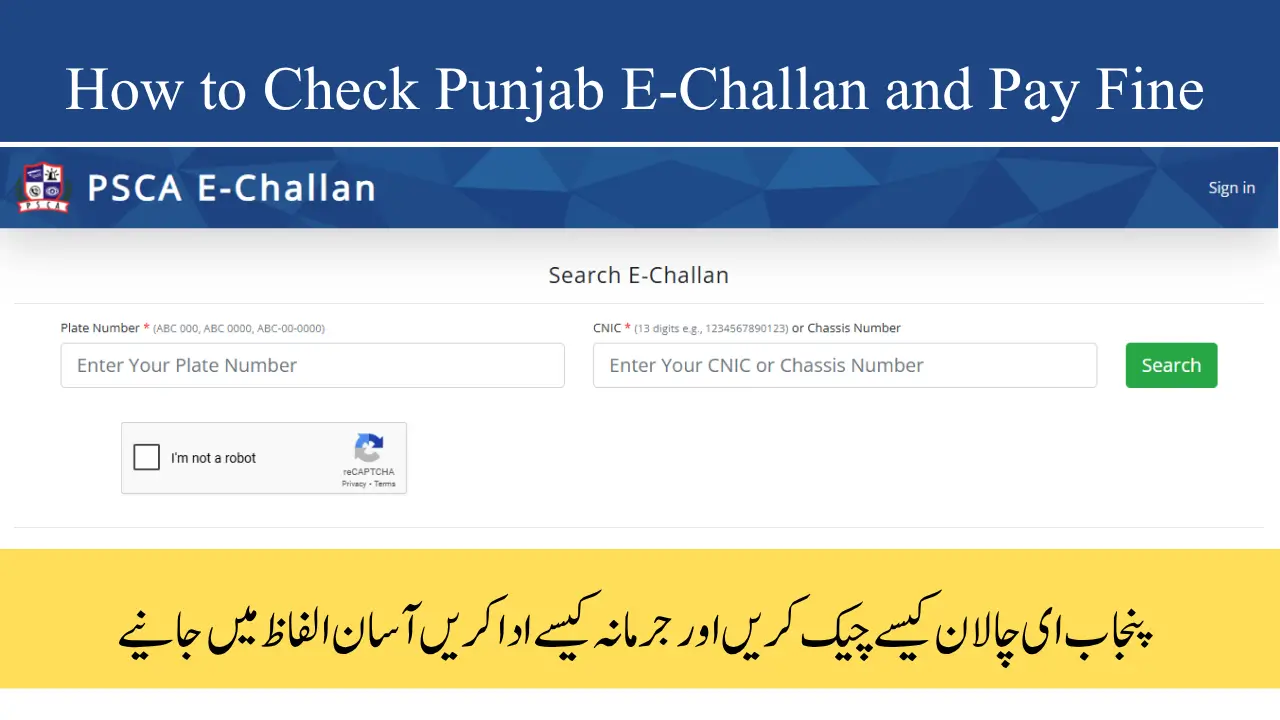
- Open the PSCA E-Challan portal or ePay Punjab website.
- Enter your Vehicle Number, CNIC, or PSID.
- Click Check Status / Search.
- View all pending fines, violation dates, and details.
This system works on both mobile phones and computers, giving instant access to your traffic history.
Also Read: KP Government Launches Insaf Female Education Card for 55,000 Girls
Step-by-Step: How to Pay Your Punjab E-Challan Online
Paying fines is secure and easy with ePay Punjab:
- Visit the ePay Punjab portal.
- Select Traffic Challan Payment.
- Enter your Vehicle Number or PSID.
- Review your pending fines and choose which ones to pay.
- Select a payment method: JazzCash, EasyPaisa, Debit/Credit Card.
- Complete the payment and download your digital receipt.
Once the payment is made, the PSCA system automatically updates your record, marking the fine as Paid.
Punjab E-Challan in Lahore and Other Punjab Cities
Lahore was the first city to implement the Safe City Project, providing full smart camera coverage for traffic monitoring. Drivers can now check E-Challan online without visiting traffic offices.
Other cities like Faisalabad, Multan, and Rawalpindi are also adopting the system, allowing residents to check fines, pay online, and download receipts for personal records.
Understanding PSID in Punjab E-Challan System
The Personal Safety ID (PSID) is a unique number assigned to every driver or vehicle in Punjab. It helps to:
- Track all traffic fines in one centralized record.
- Manage multiple vehicles under one PSID.
- Ensure accurate verification and easy online payments.
Using your PSID makes challan management simpler for families and companies that own multiple vehicles.
Common Problems & Troubleshooting
Sometimes, drivers may face issues such as “No Record Found” or payment delays. Here’s how to fix them:
- Ensure your vehicle number format matches the official registration (e.g., LEX-1234).
- Wait 24 hours if a recent violation is not showing.
- Contact the PSCA helpline (15) or visit the nearest traffic office.
- Keep a screenshot or printed copy of your payment for verification.
These simple checks save time and prevent misunderstandings about unpaid fines.
Additional Features of Punjab E-Challan
The Punjab E-Challan system offers multiple features:
| Feature | Benefit |
|---|---|
| Smart Camera Detection | Reduces human error, monitors violations automatically |
| PSID Integration | Centralizes fines and vehicle records |
| Online Payment (ePay Punjab) | Saves time with multiple payment options |
| SMS & Email Alerts | Keeps drivers informed to avoid late fees |
| Instant Receipt Generation | Confirms payments immediately, ensuring transparency |
These tools make Punjab’s traffic fine system one of the most efficient in Pakistan.
FAQs
Q: How can I check my E-Challan in Punjab?
A: Visit PSCA E-Challan or ePay Punjab, enter your Vehicle Number or PSID, and click “Check Status.”
Q: How can I pay my traffic fine online?
A: Use ePay Punjab with JazzCash, EasyPaisa, or Debit/Credit Card, and download your payment receipt.
Q: What is PSID?
A: PSID is a Personal Safety ID that tracks all fines for a driver or vehicle.
Q: Can Lahore residents check E-Challan online?
A: Yes, through the Punjab Safe City Authority portal.
Q: Is online payment secure?
A: Yes, all payments are encrypted, and a digital receipt is instantly generated.
Q: How to dispute an incorrect challan?
A: Verify details (vehicle number, date, location) and submit a complaint online or visit the traffic office with supporting evidence.
Conclusion
Punjab E-Challan system is a modern, efficient, and secure way to manage traffic fines. With PSCA smart cameras, PSID integration, and ePay Punjab’s online payment options, drivers can monitor and pay fines from anywhere in minutes.
Regularly checking and paying your E-Challan not only avoids penalties but also promotes transparency and road safety across Punjab.